Showing posts with label Card Back-up. Show all posts

Sunday, November 21, 2010

Hyperdrive in-field update: Down but NOT out!


So after being mis-handled and roughed up on many an occasion, we managed to kill (temporarily) the HyperDrive the other day when one of us (not saying any names, but it wasn’t me) decided to move our laptop at the theater the other night because I didn’t “properly distributed the table cloth from front to back”. Well, long story short she ran out of USB cable before the Laptop got to it’s new temporary destination and pulled the Hyperdrive right off the table. When I came back from the rest room she looked at me with “that face”. You all know that face right? I have had “that face” on a couple of times in my career unfortunately.

At first it did not turn on, but I was quickly able to deduce that it sounded as if the battery had come loose. Two screws got the back cover off and I could quickly see that the battery prongs actually were spread due to the impact leaving the battery floating free unable to touch both contacts at the same time. This was an easy in field fix to just bend them back inward. It still turned on and the OS seemed intact, but there was not reading the internal hard drive. This was really not big surprise to me however. That was a 32” fall onto solid a marble floor. Might have faired better if it was in it’s neoprene case, but it wasn’t unfortunately.

I was no doubt depressed as I felt my little friend had just kicked it.

The next morning after checking the support site to confirm the symptoms of the hard drive failure, I ran out to Office Max and picked up a new 2.5” 500Gb hard drive for $80 and I was back online again, but now with DOUBLE the capacity! Nice upgrade! It was an easy plug and play. Two screws to get the back case open, the old drive pulled right out and the new one popped right in. Upon start-up I was prompted to format the new drive, I confirmed, and the Hyperdrive did the rest.

So the conclusion here is that despite a lot of bumping and dumping, this unit has established itself as an ESENTIAL part of our workflow.

If you had read my original review on this, we use this as an intermediate step between our computers and our cameras. Why you might ask? Well here are three BIG reasons that I can not imagine not having this device in our workflow.

- First, for one or more shooters photographing on multiple cards at an event, this serves as an instant on location back-up of your files. We also make sure our clients know that we do this. Mind you we do not erase the cards as they are back, we are simply backing them up.
- Second, when you arrive home from a venue, in a lot of cases late at night, you now have a single source upload to you workstation. This means you can start your upload and go to bed…that's right, nighty night! No waiting around shuffling cards.
- Third, we now have another back-up of all our files dating back anywhere from 4 months to a year depending on our throughput. As the drive fills, I simply dump the oldest 50-100Gb at a time. Now with the new drive, I have easily 400Gbs of history in addition to our back-up systems already in place. This drive has saved our ass on a couple of occasions now.
Another thing to note is that the battery has outlasted my expectations. I have only needed to charge it via the supplied wall plug once or twice as it charges itself via the USB cord whenever it is plugged connected to my PC.

Why not an Espon Storage device you ask? Sure, it will provide the same function, but unless you want to pay almost double for the same amount of space and some extra features (that we have no need for) I would stick with the Hyperspace. (Why buy an expensive multitool when all you need is a screwdriver?)

Check it out…

Tuesday, April 28, 2009

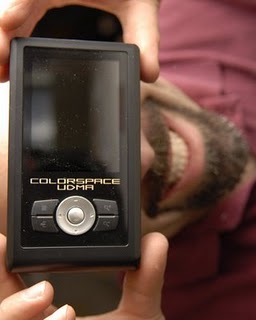
Hyperdrive UDMA - Fasten your Seatbelts!


So we were using an older Epson P-2000’s to fill the roll of onsite card backup and this was working well for us …..until we started buying the UDMA versions of our compact flash cards. Our Epson would not read them (in all fairness, I think the new versions take them). This put a crunch on our wedding workflow as typically all our cards are copied to this one drive on location so that when we get back to the office, it’s only a matter of transferring all the images from one location and not 6 different cards. Who wants to get home at 1 AM and start shuffling cards in the reader?
So, when I was ready to upgrade, I quickly came to realize again how much the “gig per dollar” factor was with the Epson units. The problem here is that with the Epson units you are not only buying a card back-up system, but an all around media play with all kinds of bells and whistles. Nice, if that is how you use it. For us, we only needed a portable means of on site back-up and a place to pool all the images for a single point upload for when we returned to the office. After doing some searching, I came across the Sanho Hyperdrive site. My eyes where quickly focused on the newest badest ass version (as I am popular for) called the Hyperdrive UDMA. Boasting blazing transfer speed on both the UDMA and non-UDMA card versions it also had a great “gig per dollar” factor. I knew this would work for us. I put an order in for the unit and was told they had not even started distributing in the US yet. So I waited…and waited…and waited. Eventually it showed up.

Just and FYI, I got the 250 gig version and they have a few sizes to choose from. Our approach again is that this also serves as a job by job back-up. Once the drive is full, we will start wiping 50-75 gig of the oldest jobs off at a time. Can never have enough back-up!


My first impression, though the body look was very clean, was that it felt a little cheap. The power on switch almost felt too loose as if it was going to come off. When you tip the unit from side to side you can here something inside clicking back and forth in there. So right away I was apprehensive. What was cool is it that it came with a car charging USB power adapter too. So I powered it up barely reading through the quick start guide (yes, just like a man) and started looking around. Again coming from the Epson units the navigation also did not seem that intuitive or friendly. Another plus was the neoprene case that will add some protection for the unit.
So, I held down my opinions and off to it’s first wedding it went with us. Remember, we use it as a back-up and not primary storage device. Please don’t gamble with images until you proven the process first = ) We had stopped using the Epsons at this point all together anyway as it would only take some of our cards so I had we had nothing to lose. Time came to copy the first card. I loaded it in an initiated the back-up and ………HOLY &*$@ FAST !!! Right there in the middle of a wedding, a devilish grin came over me as I was ready to start cart wheeling across the dance floor. Maybe I was just coming from to old a technology, but there was no mistake in there claims. Previously we would still be copying images on the ride home from a wedding hoping that batteries would not run out mid-copy (yup again, I was too cheap to by the car charger). Never again though! This beast was eating data from both of our cameras in stride.


So here is the Tic Tac Time Trial:
7.6 Gig from a SanDisk Extreme III NON-UDMA card
6 Minutes and 58 Seconds.


The battery life is awesome too. I have not put a dent in it yet and I think I have charged it maybe once or twice.

It likes to shut itself down when it is not in use which can be a little freaky at times. Still not being used to the speed, I can never tell if it finished the back-up when I come back and it is off already, though it has. I will have to look at the setting preferences more and see if that can be changed. Again, like a guy, the manual receives minimal attention.

I will update you on these items as I find this stuff out.

In short, nothing bad has happened and it is the fastest that I have come across. I would not recommend banging it around at this point. I will let you all know when I have an accident and I’ll tell you how it does.

What is also cool is that it displays the data transfer rate as well as the expected finish time. This proved to be accurate within a couple of seconds.

Update 5/14/09
I am reading that shutting down the "create thumnail" option increases the speed. I wil have to try this an report back.

Here is another review on the Hyperdrive that I came across at Luminous Landscapes. Check it out

Update 11/21/10
Read the latest in field update!