We are excited about this training "Dynamic Lighting for Weddings and Portraits"--Dan's work is outstanding and we are looking forward to training with him. We will be meeting with Dan early this week to firm up details and will get word out by Wednesday. But, for now, the date is April 25, 9am-4pm.
I am posting this info here because we just learned our server had a "problem" last night and is still being "repaired." UGH! So, if you have landed here after not being able to access our site, rest assured, we'll be back on line...shortly...isn't that what they always say?
LOL
Gail
Saturday, March 20, 2010

Thursday, February 18, 2010
A PPAM SLAM
(Prepping for the 2010 Print Competition and Convention)
So once again this year we have managed put oursleves right on the deadline for the PPAM Print competition the following weekend. Deadline of course was the next day. I don't know... we seem to love the heat. We did not get to enter into PPANE because of major computer issues last year a week before the convention, so I did not want to miss a print comp again!
We made a couple of attempts at outsourcing our print work this year. I just really still have an issue with outsourcing my own print work. Always have been a "do-it-yourselfer" which is curse that I would not wish on my worst enemy. We did send out our black and whites to DSI and loved them right out of the box. Thank you Eric and Chris = )

I again called on Nancy Green for guidance and, as she did for us last year, she kept me from jumping. Thanks again Nancy! And a thank you to Steve Stedman as well!
So for our color entries I toiled all night to get my four entries and Gail's one done.
I set-up lights pretty much on spec. The halogen model lamps in our Alien Bees cast a nice smooth light and I was able to meter them right into ISO 100, 1 second @ f16 at a distance of about 4 feet. Even though the lights are not set at the exact distance and spread, I figure this will be close enough for me to ensure that my whites are not over the top.
With that done, the latex gloves were snapping, hard drives were spinning, printer were spooling, test strips were flying, glue was spraying and matt cutters were cutting. Still have glue stuck to my arm hair (curse of the Italian, comes with the territory).
Can't wait to see how they do. I felt like I entered a good a variety of work this year. I like to see how these differnt areas of my style will fair. Gail has only two she is enetring this year and I think she might kick my ass with it...we'll see. Best of luck Babes!
So once again this year we have managed put oursleves right on the deadline for the PPAM Print competition the following weekend. Deadline of course was the next day. I don't know... we seem to love the heat. We did not get to enter into PPANE because of major computer issues last year a week before the convention, so I did not want to miss a print comp again!
We made a couple of attempts at outsourcing our print work this year. I just really still have an issue with outsourcing my own print work. Always have been a "do-it-yourselfer" which is curse that I would not wish on my worst enemy. We did send out our black and whites to DSI and loved them right out of the box. Thank you Eric and Chris = )

I again called on Nancy Green for guidance and, as she did for us last year, she kept me from jumping. Thanks again Nancy! And a thank you to Steve Stedman as well!
So for our color entries I toiled all night to get my four entries and Gail's one done.
I set-up lights pretty much on spec. The halogen model lamps in our Alien Bees cast a nice smooth light and I was able to meter them right into ISO 100, 1 second @ f16 at a distance of about 4 feet. Even though the lights are not set at the exact distance and spread, I figure this will be close enough for me to ensure that my whites are not over the top.
With that done, the latex gloves were snapping, hard drives were spinning, printer were spooling, test strips were flying, glue was spraying and matt cutters were cutting. Still have glue stuck to my arm hair (curse of the Italian, comes with the territory).
Can't wait to see how they do. I felt like I entered a good a variety of work this year. I like to see how these differnt areas of my style will fair. Gail has only two she is enetring this year and I think she might kick my ass with it...we'll see. Best of luck Babes!
Wednesday, February 10, 2010
NO MORE PIXEL WAR !!

The MEGAPIXEL, Oh yes, the digital camera salesmen's best friend.
So I ask the question: Do we really have the need for more?
Go ahead and ask the average consumer about image to noise ratio...or what good glass really means.
So when will it stop I ask?
Is there really a need for 30 MP image files. In truth it depends on what your doing, but in most cases I am going out on a limb here and say NO F%^@$ WAY.
To add irony to it all, some of the same Photogs that are still pixel hungry and are itching to upgrade to larger Mega-pixel cameras still shoot Jpegs instead of RAW! Don't even get me started there.
Do we strive for quality? Absolutely, That is why we shoot nothing but RAW files for starters, but if I can barely see the difference I would bet my clients surely won't. Nine times out of ten they will end up picking the image that you are the LEAST passionate about anyway, right?
Might it be a possibility that we will see cameras that you can dial back a 30Mp image sensor to say a 15Mp image?. You know, something more deserving of a bunch of drunk people grinding it out on the dance floor at a wedding reception at 11:30PM at night.
The chips will and in some cases already have pushed the limits of detail that the lenses themselves are capable of capturing. So again, what's the point!
Don't get me wrong here, I am all for the progress and advancement of digital photography technology and I am looking to upgrade my camera bodies too, but I will upgrading more for the reason of better image to noise ratio at higher ISO's mainly.
I just think that my customers won't see or won't need a few million of those pixels that I am constantly chugging. To be honest, I don't think it has ever been an issue.
Now seriously...LOOK AT THIS!!!

This is an image file from a Nikon D300. A great camera, but pretty outdated at this point at 12 Megapixels. This crop would be the equivalent of a 20x30 and guess what? It would STILL be a sharp print.
How much more does my client need.
His hair follicles are so sharp guess what I end up doing...dulling it down!
Increasing image to noise ratios would get you just as far in most cases.
Personally, here is something that I would like to see be developed in the future and you heard it here first! A Digital chip that stores light data over time in a exposure thus allowing us to always over expose an image a bit and then, in post production, revert/dial back the recording history of the exposure itself in the blown out areas to get infoprmation back. A kind of super recovery tool.
OH YES, give that to me. I will gladly sacrifice some pixels for that capability.
Here are some other sites that gave me a little inspiration on this topic...
Techmiso
Monday Note
Consumer Reports.org
Comment 2/11/10:
John Flahrety - Diamond Photo Design
Hi George,
I really enjoyed reading your Pixel War blog post. I do understand your thought process. I am also totally on board with RAW processing of image files but I want MORE!!! I challenge you to think bigger, much bigger.
Personally, I L-O-V-E the ever increasing resolution of these cameras. I'm not much of a writer but here are my thoughts... Sure I have beautiful 24x36 images hanging in our studio from a 4 mega-pixel Canon 1D camera. Could it be better? Absolutely. You may not see a huge difference comparing an 4MP image to a 12MP image but you will see differences if you compare that 4MP image to Canon's 21MP file. I can see a difference in Canon's 21MP file when compared to Hasselblads 60MP file so I say let the war continue.
The number one reason for adding more mega-pixels to my wedding work is, I love to crop. More mega-pixel resolution means I can use more extreme crops in Lightroom with very little quality loss.
"Fashion and commercial" photographers shoot mostly for 8x10 rough off-set magazine print so why do they use the Hasselblad 40-60 megapixel cameras? They set themselves apart from us "Wedding & Portrait" shooters with super-clean-high-resolution images that look different than Canon and Nikon images. Hasselblad and the other medium format camera manufactures are showing their gear is worth the price and file sizes they claim. When these manufactures continue the "Mega-Pixel March" we will benefit with better technology in all areas not just more mega-pixels.
The Wedding and Portrait industry is already inundated with "amateurs". I would love to see Canon and Nikon keep the amateur cameras below 15mega-pixels and drive up our pro cameras to 40-60-80- even 100 mega-pixels. As a pro I expect my images, file sizes, computers, workflow, and finished work to far,far exceed what people get from Best Buy and Radio Shack and soccer moms.
I would love to see a clients face when they ask for the "Digital Negatives" and the photographer gives them 300MB files :) Another one of my theories is JPG killed the pro photographer. If we all just shoot professional RAW files then process to 16bit TIF files the digital negatives would need to be handled by pros only. We are our own worst enemy.
George your next blog post should be "Just say NO to JPGs".
-John
Saturday, February 6, 2010
Get the Lowe Down!!
LowePro Camera Bags
Can I tell you how much I love my LowePro Bags!
Aside from all the great features and durability of these you gotta love a company that will back what they make.
For the first time in all my LowePro bag history (and I have a lot of history)...

lets see...
Orion
Nova 5 AW
Top Loader 65
Top Loader 70
Lowe Pro Pro Mag 1
Lowe Pro Pro Mag 2
Lowe Pro Photo Trekker Bag
Lowe Pro S&F Specialist 85 AW
Road Runner AW
Sling Shot 300

...I had a zipper issue.
Well, one phone call, no BS and DONE!
Got my replacement bag shipped directly to me and I did not have to return my old one.
Gotta love that! And that is why I never look any further.
A big thanks to Maury at LowePro for your help!
Can I tell you how much I love my LowePro Bags!
Aside from all the great features and durability of these you gotta love a company that will back what they make.
For the first time in all my LowePro bag history (and I have a lot of history)...
lets see...
Orion
Nova 5 AW
Top Loader 65
Top Loader 70
Lowe Pro Pro Mag 1
Lowe Pro Pro Mag 2
Lowe Pro Photo Trekker Bag
Lowe Pro S&F Specialist 85 AW
Road Runner AW
Sling Shot 300
...I had a zipper issue.
Well, one phone call, no BS and DONE!
Got my replacement bag shipped directly to me and I did not have to return my old one.
Gotta love that! And that is why I never look any further.
A big thanks to Maury at LowePro for your help!
Monday, February 1, 2010
Dirty Deeds...Done Dirt Cheap!
The ALZO Wireless Radio Shutter Release

OK, imagine this:
A young climber engaged in an intense competition scales an impossible overhanging wall in front of a huge crowd, defying the shear laws of gravity itself.
She holds on with one hand and with the other reaches to pluck a fifty dollar bill off the wall and claim her prize. Just as the money is about to be pulled free from the wall... BOOOOOOM - all 190 lbs of Italian Photographer falls onto her sending the two of them crashing down 20 ft in front a crowd of stunned onlookers.
Sounds like a photographer’s nightmare!
Now that did not happen and why you ask?

Well, following the advise of Mr. Miyagi himself...
"Best Defense...No Be There!"
I was on the ground safe and out of the spotlight(to the right of this young lady's head in the image).

ALZO Wireless Radio Shutter Release
At $40 on Amazon, you can't beat this side kick's performance and price.
How solid is it you ask? More than $40 solid I would say.
With the dip switches surface mounted (yet sunk in to protect against most accidental changes) I believe you could even key in multiple receivers to one transmitter.
It is more compact than my Promaster (at $85), sleeker looking and HALF the price. Let me say that again...HALF the price!
The only draw back, no flash shoe mount. Nothing that $1 in Velcro can't solve though (trust me I will get over it).
And what if you sit on it or drop it into the ocean, it is cheap to replace. I have lost more expensive things in my career.
Do yourself a favor and BUY IT! ...

OK, imagine this:
A young climber engaged in an intense competition scales an impossible overhanging wall in front of a huge crowd, defying the shear laws of gravity itself.
She holds on with one hand and with the other reaches to pluck a fifty dollar bill off the wall and claim her prize. Just as the money is about to be pulled free from the wall... BOOOOOOM - all 190 lbs of Italian Photographer falls onto her sending the two of them crashing down 20 ft in front a crowd of stunned onlookers.
Sounds like a photographer’s nightmare!
Now that did not happen and why you ask?

Well, following the advise of Mr. Miyagi himself...
"Best Defense...No Be There!"
I was on the ground safe and out of the spotlight(to the right of this young lady's head in the image).

ALZO Wireless Radio Shutter Release
At $40 on Amazon, you can't beat this side kick's performance and price.
How solid is it you ask? More than $40 solid I would say.
With the dip switches surface mounted (yet sunk in to protect against most accidental changes) I believe you could even key in multiple receivers to one transmitter.
It is more compact than my Promaster (at $85), sleeker looking and HALF the price. Let me say that again...HALF the price!
The only draw back, no flash shoe mount. Nothing that $1 in Velcro can't solve though (trust me I will get over it).
And what if you sit on it or drop it into the ocean, it is cheap to replace. I have lost more expensive things in my career.
Do yourself a favor and BUY IT! ...
Tuesday, January 26, 2010
Lightroom 2.6 Networking Version!
Sounds too good to be true?
Well...we have it!
This topic now updated for 2011
In our small home Network, Gail and I always had an issue with me keeping the Lightroom Cat files local to my system. Granted I do 95% of the initial editing so it made sense, but the issue always came up when she needed to re-export files or modify 1 or 2 more images for the customer. Previously this meant she had to interupt what I was doing (as I was the only one that could access actual files) and/or kick me off of my work station. This is the plight of many LR users and I think everyone would agree this is the last big step Adobe needs to take with LR. I think Adobe knows this and I will be interested to see what they have up their sleeve when it happens.
OK, I am sure the folks at Adobe might not give it their blessings, but here is a work around I saw online on “Team Louish”. I ran this by our computer tech (who just happens to be the best in the world by the way) he gave it his blesssing and so this is what we've done.
Some quick things to note...
The system we did this on is a Windows XP Pro 32 bit, though with some minor differences, this should work very similarly on most Windows systems.
The article where I first saw this also talks about the ability to do this on a Mac, but you are on your own there.
Please note that anything you do to your system is YOUR responsibility. This is why I handed to our experienced tech.
Though he does tell us that the workings behind this don't pose any serious system issues, I have yet to test "Crossing the Streams"(a little "old school" Ghostbusters terminology) in LR with a test cataolouge. By that I mean, accessing a DB from two different locations simultaneously. I see this as the only real danger here. Worst case scenario you can corrupt the test Cat file.
All the more power to the nightly back-ups! (see previous blog entries)
This will work for a folder and/or drive on another networked workstation (as in our case)or for an entire NAS (network attached storage device).
So here it is...
These DOS commands in the BAT below file are how my tech tells me they used to mount/connect to drives back in the DOS days. He also said that he thinks Adobe overlooked this “back door” given that they have not allowed Networking as an option publicly thus far. Never the less I have seen a few people online that also say they have done this and have not had an issue with it.
On the PC hosting the cat file...
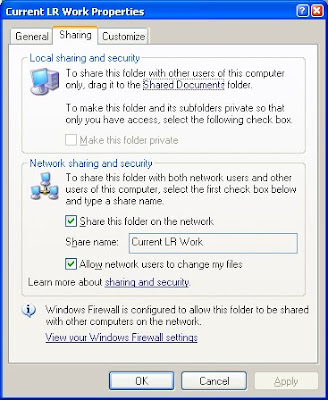
If you do plan access a drive on or external hard drive connected to another computer, it must be first shared under the properties tabs and also check "Allow users to change my files" otherwise Lightroom will fail to open from the remote system.
On the REMOTE PC that will be accessing the networked cat files...
From the remote system from which you would like to access LR Cat files from, start by making a text file in Note Pad and name it “Start.bat”. I think it can be named anything, just has to be a “.bat” file. Name it as something you will recognize (i.e. mapdrives.bat).
So once you have created the “.bat” file, you then you need to get the actual network address for your NAS or main workstation (where the Cat files are local) from that remote workstation (.i.e . “ \\d63rgzc1\drobo (I)” where in our case d63rgzc1 is my system address on the network and “drobo (I)” is the drive as seen on my workstation). (If you are mapping a drive on another computer, this can usually be found on the computer name tab of My Computer Properties.)
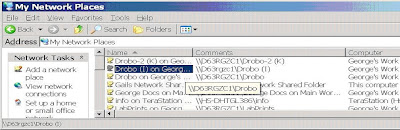
Using those addresses create a command line in the .bat file for the each drive(s) you would like to access on your NAS that has your cat files (might be only one in your case).
Note: In my particular case, we had to use the quotes because there were physical spaces in the share names in all my shared drive names. If the drive(s) were named something without spaces no quotes would have been needed below.
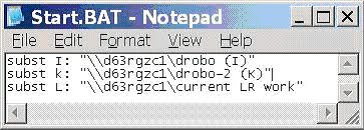
So for us, we had 3 different locations on my PC (including a Drobo connected directly to my system) that we wanted mapped to show as local on Gail’s system as local so she could access it with LR on here system.
As an example the “subst k” command tells the workstation to substitute/create “k” as a local drive letter on that PC which points to "\\d63rgzc1\drobo-2 (K)" which is on my system.
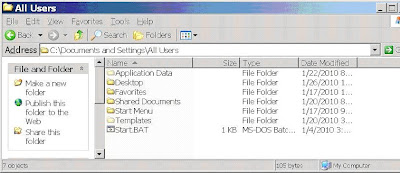
Once you are done with that, save the “.bat” file (“Start.bat” file in our case) in the “All Users” folder of that workstation (see below).
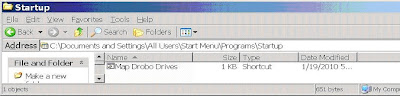
Then you want to create a shortcut of this file (right click, create shortcut) and place it in the “C:\Documents and Settings\All Users\Start Menu\Programs\Startup” folder as seen below. This will now run upon system start-up. In this case (below) we renamed the shortcut “Map Drobo Drive” just so we know not to scrub by accident thinking it was malicious. This is again is just a shortcut that points to the Start.bat file renamed for better recognition.
After which that drive(s) might start showing up as they did for us as disconnected network drive (below). Don’t let that worry you just continue. We were told not to worry about names though looking at it now, I think you can right click here and just rename it to something less alarming. Again if you test this from one station first you will know whether you can or can’t (tell me if you do = .)
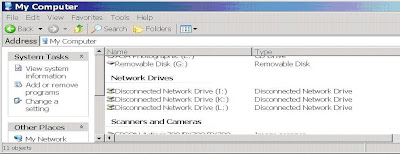
We were not to worried about names though looking at it now, I think you can right click and rename it. Again if you test this from one station you will know (then tell me if you do = )
After that when you are in Lightroom and trying to open a file on the Network, make SURE that you are pointing to the correct drive. Notice (below)how these drives now show up under “My Computer" and NOT “My Network Places”. NICE!!!
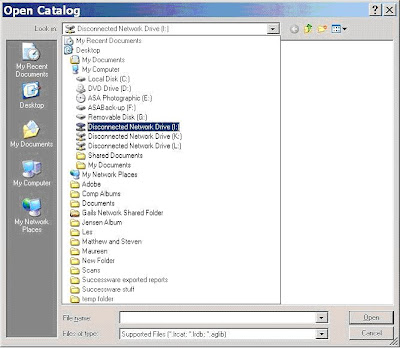
You should be good to go from there.
Well...we have it!
This topic now updated for 2011
In our small home Network, Gail and I always had an issue with me keeping the Lightroom Cat files local to my system. Granted I do 95% of the initial editing so it made sense, but the issue always came up when she needed to re-export files or modify 1 or 2 more images for the customer. Previously this meant she had to interupt what I was doing (as I was the only one that could access actual files) and/or kick me off of my work station. This is the plight of many LR users and I think everyone would agree this is the last big step Adobe needs to take with LR. I think Adobe knows this and I will be interested to see what they have up their sleeve when it happens.
OK, I am sure the folks at Adobe might not give it their blessings, but here is a work around I saw online on “Team Louish”. I ran this by our computer tech (who just happens to be the best in the world by the way) he gave it his blesssing and so this is what we've done.
Some quick things to note...
The system we did this on is a Windows XP Pro 32 bit, though with some minor differences, this should work very similarly on most Windows systems.
The article where I first saw this also talks about the ability to do this on a Mac, but you are on your own there.
Please note that anything you do to your system is YOUR responsibility. This is why I handed to our experienced tech.

Though he does tell us that the workings behind this don't pose any serious system issues, I have yet to test "Crossing the Streams"(a little "old school" Ghostbusters terminology) in LR with a test cataolouge. By that I mean, accessing a DB from two different locations simultaneously. I see this as the only real danger here. Worst case scenario you can corrupt the test Cat file.
All the more power to the nightly back-ups! (see previous blog entries)
This will work for a folder and/or drive on another networked workstation (as in our case)or for an entire NAS (network attached storage device).
So here it is...
These DOS commands in the BAT below file are how my tech tells me they used to mount/connect to drives back in the DOS days. He also said that he thinks Adobe overlooked this “back door” given that they have not allowed Networking as an option publicly thus far. Never the less I have seen a few people online that also say they have done this and have not had an issue with it.
On the PC hosting the cat file...
If you do plan access a drive on or external hard drive connected to another computer, it must be first shared under the properties tabs and also check "Allow users to change my files" otherwise Lightroom will fail to open from the remote system.

On the REMOTE PC that will be accessing the networked cat files...
From the remote system from which you would like to access LR Cat files from, start by making a text file in Note Pad and name it “Start.bat”. I think it can be named anything, just has to be a “.bat” file. Name it as something you will recognize (i.e. mapdrives.bat).
So once you have created the “.bat” file, you then you need to get the actual network address for your NAS or main workstation (where the Cat files are local) from that remote workstation (.i.e . “ \\d63rgzc1\drobo (I)” where in our case d63rgzc1 is my system address on the network and “drobo (I)” is the drive as seen on my workstation). (If you are mapping a drive on another computer, this can usually be found on the computer name tab of My Computer Properties.)

Using those addresses create a command line in the .bat file for the each drive(s) you would like to access on your NAS that has your cat files (might be only one in your case).
Note: In my particular case, we had to use the quotes because there were physical spaces in the share names in all my shared drive names. If the drive(s) were named something without spaces no quotes would have been needed below.

So for us, we had 3 different locations on my PC (including a Drobo connected directly to my system) that we wanted mapped to show as local on Gail’s system as local so she could access it with LR on here system.
As an example the “subst k” command tells the workstation to substitute/create “k” as a local drive letter on that PC which points to "\\d63rgzc1\drobo-2 (K)" which is on my system.
Once you are done with that, save the “.bat” file (“Start.bat” file in our case) in the “All Users” folder of that workstation (see below).

Then you want to create a shortcut of this file (right click, create shortcut) and place it in the “C:\Documents and Settings\All Users\Start Menu\Programs\Startup” folder as seen below. This will now run upon system start-up. In this case (below) we renamed the shortcut “Map Drobo Drive” just so we know not to scrub by accident thinking it was malicious. This is again is just a shortcut that points to the Start.bat file renamed for better recognition.

After which that drive(s) might start showing up as they did for us as disconnected network drive (below). Don’t let that worry you just continue. We were told not to worry about names though looking at it now, I think you can right click here and just rename it to something less alarming. Again if you test this from one station first you will know whether you can or can’t (tell me if you do = .)

We were not to worried about names though looking at it now, I think you can right click and rename it. Again if you test this from one station you will know (then tell me if you do = )
After that when you are in Lightroom and trying to open a file on the Network, make SURE that you are pointing to the correct drive. Notice (below)how these drives now show up under “My Computer" and NOT “My Network Places”. NICE!!!

You should be good to go from there.
Tuesday, December 8, 2009
Batta Bing BETA BOOM!! Lightroom Beta 3 !!
Lightroom 3 Beta with...drum roll please...WATERMARKING ON EXPORT.

After finishing up a few cartwheels around the office and rounding up the last few verses of "Alleluia Alleluia" I could hardly wipe the smile from my face.
A simple little interface that gives us exactly what we have been dreaming about.

You can select standard text or pull in your own logo, scale it up or down, designate location and opacity.
This will go on ALL our image export once we are running L3 fully.
I am also hearing whispers of networkability (the kind that you don’t need to computer hack to get it to work). That will bring on a few more cartwheels for sure!!
Adobe overhauled the import module. It scared me at first as I could quickly tell that I was not in Kansas anymore.
Everything is still there, just arranged differently. There are some advanced capabilities here too.


When you click the for previews in the import window, it starts to look more like you are in Lightroom verses in the Import window.
Another sweet feature is the Custom Picture Package in the Print module….

Are you seeing this? It is no mistake. You can drag and drop different pictures from the lower preview bar and then drop them in and resize, overlap, send forward, send back… It is starting to flirt with the makings of a collage builder right inside Lightroom!
Can not wait until the full version comes out.
Man I am so glad I jumped on the program at Beta 1! It ROCKS.
I have said it before and I will say it again and you can quote me on this one …
“Lightroom is the best thing to happen to photographers since the dawn of digital photography itself!”

After finishing up a few cartwheels around the office and rounding up the last few verses of "Alleluia Alleluia" I could hardly wipe the smile from my face.
A simple little interface that gives us exactly what we have been dreaming about.

You can select standard text or pull in your own logo, scale it up or down, designate location and opacity.
This will go on ALL our image export once we are running L3 fully.
I am also hearing whispers of networkability (the kind that you don’t need to computer hack to get it to work). That will bring on a few more cartwheels for sure!!
Adobe overhauled the import module. It scared me at first as I could quickly tell that I was not in Kansas anymore.
Everything is still there, just arranged differently. There are some advanced capabilities here too.


When you click the for previews in the import window, it starts to look more like you are in Lightroom verses in the Import window.
Another sweet feature is the Custom Picture Package in the Print module….

Are you seeing this? It is no mistake. You can drag and drop different pictures from the lower preview bar and then drop them in and resize, overlap, send forward, send back… It is starting to flirt with the makings of a collage builder right inside Lightroom!
Can not wait until the full version comes out.
Man I am so glad I jumped on the program at Beta 1! It ROCKS.
I have said it before and I will say it again and you can quote me on this one …
“Lightroom is the best thing to happen to photographers since the dawn of digital photography itself!”
Subscribe to:
Posts (Atom)